Project: Play2Learn Single-Page Application Project
Grading | RulesUsing the JavaScript skills you have learned, you will be building a responsive single-page application with either Vue.js, React, or jQuery where your users have the ability to play two different games:
- Anagram Hunt - a game for finding anagrams.
- Math Facts Practice - a game for practicing math facts.
Read through the entire project instructions before beginning the project.
The Website
We have included wireframes with notes below. You may choose to design the web application differently, but you must include all the components shown on the pages.
Start Screen
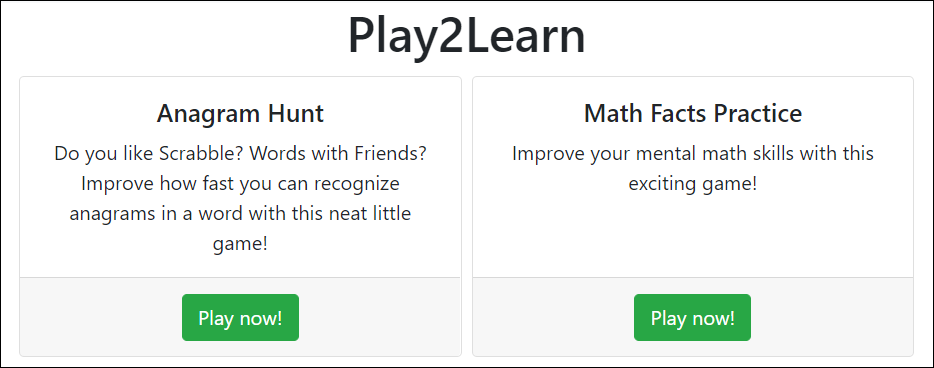
The start screen should have links to the start pages for the two games.
Games
Anagram Hunt
An anagram is a word made by rearranging the letters of another word. For example, post, pots, opts, tops, and spot are all anagrams of stop. The object of the Anagram Hunt game is to find the most anagrams for words of a specified length in a minute (or however long you decide).
Start Page
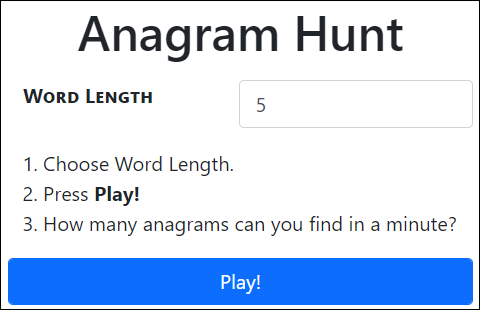
On the start page, the user should be able to specify a word length and press Play! to start the game.
Play Page
When the user selects a word length and clicks Play!, the game starts:
- You should choose a random word of the correct length from the words in the
anagramsarray found in this JSON file, which you should include in your project.- Examine the structure of the file. Notice that it is an array of arrays.
You will first select a random array from the outer array. Be sure to only choose from arrays that contain words with the specified number of letters. For example, if the user selects 5-letter words, you might end up with this array:
[ "bared", "beard", "bread", "debar" ]- Then select a random word from that array. For example, you might select "beard". You should display that word along with the number of anagrams it has (“beard” has 3, not including itself):
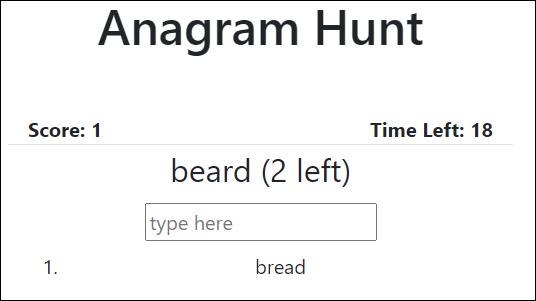
- When a user types in a correct anagram and presses Enter, their correct answer should be listed below, score should go up by 1, and the number of anagrams left should go down by 1 (after “bread” is guessed, there are now 2 possible anagrams left for “beard”).
Note: the user should not be able to guess the word itself (e.g., beard) or a word that has already been guessed (e.g., bread). - As soon as the user guesses all of the possible anagrams in the current array of words, another random array with words of the same length should be grabbed and a new word should be displayed.
- The Time Left countdown should start at 60 and decrease by 1 every second.
- The game ends when the timer runs out or when the user has completed all of the word arrays for words of the specified word length.
Game Over Page
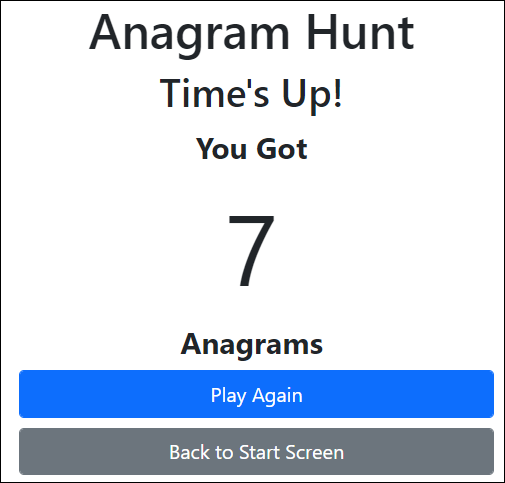
The Play Again button should go back to the start page for the Anagram Hunt game.
The Back to Start Screen button should go back to the start screen where the user can select the game they want to play.
Math Facts Practice
This is a simple game for practicing addition, subtraction, multiplication, and division. The goal is to answer the most questions in 30 seconds (or however long you decide).
Start Page
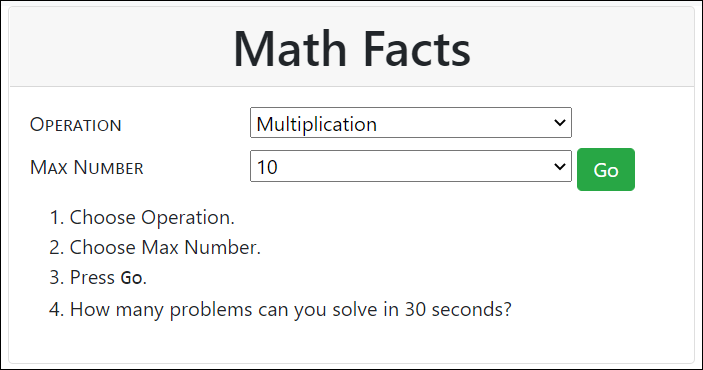
On the start page, the user should be able to specify an operation, a max number, and press Go to start the game.
Play Page
When the user selects an Operation and Max Number and clicks Go, the game starts:
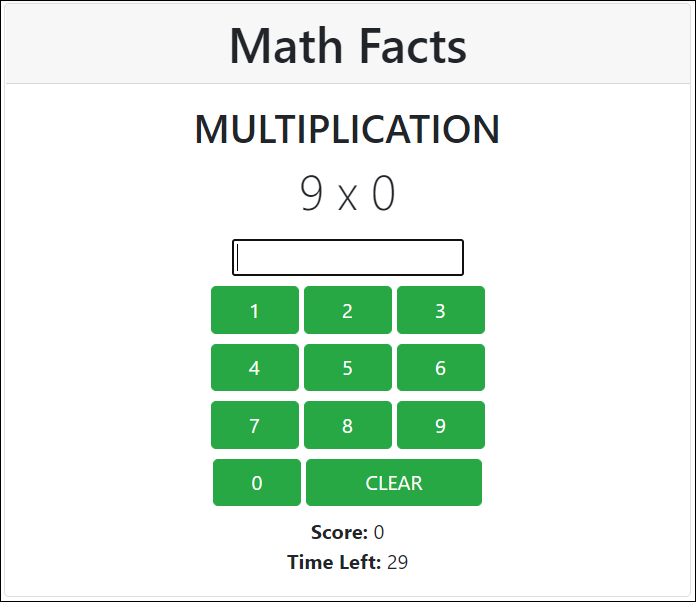
- A random problem using the operation with numbers equal to or below the max number should be generated.
- The user should be able to type the answer into the input or use the buttons. As soon as the user gets the correct answer, the score should go up by one, and a new problem should appear.
- The Time Left countdown should start at 30 and decrease by 1 every second.
- The game ends when the timer runs out.
Game Over Page
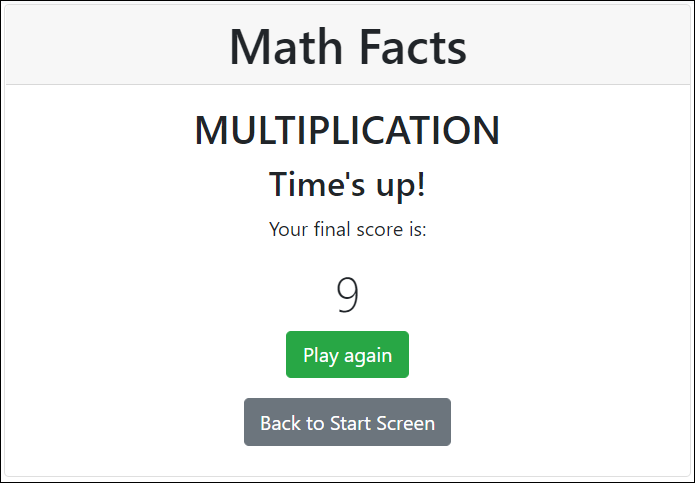
The Play Again button should go back to the start page for the Math Facts game.
The Back to Start Screen button should go back to the start screen where the user can select the game they want to play.
Grading
Your grade will be calculated based on the following categories, with the amount that each category contributes to your overall grade:
Start Screen: 10%
- (10%) Can successfully navigate to the start page of each game.
Anagram Hunt: 45%
- (10%) Can successfully start game with a word length specified.
- (25%) Game play is completely functional with no bugs.
- (5%) Game successfully ends and displays score.
- (5%) At end of game, user can restart the same game or go back to the start screen.
Math Facts Practice: 45%
- (10%) Can successfully start game with operation and max number specified.
- (25%) Game play is completely functional with no bugs.
- (5%) Game successfully ends and displays score.
- (5%) At end of game, user can restart the same game or go back to the start screen.
Rules
This project is meant for you to use your own skills and knowledge. This means that we expect the work to be your own work. We also expect that you will want to look some stuff up. Please feel free to use your course manual and the course content to help you along. You may also use the Internet as a source of help, especially for looking up documentation and errors.
Note that the instructor is not a resource during this project. The purpose of the project is to evaluate how well you can do without access to the instructor.
What if I have a question?
Please do not email your question. Ask it through a course.
- If you have a question about the work you are doing on the project, go to a related activity within one of your courses and ask your question on that activity.
- If you do have a question about the instructions, return to any activity in one of your courses, and ask it from there.
Again, please do not email. If you do, we will direct you back to your courses, so that you can ask your instructor the question there.